Showing posts with label wikis. Show all posts

Tuesday, November 13, 2007

CIT 2007 - Keeping Up With the Jetsons - Teaching and Learning With Web 2.0

This half-day workshop was presented by Shelley Rodrigo of Mesa Community College, part of the Maricopa Community Colleges system. Shelley has a background as an English instructor and us currently an instructional technologist and is involved with faculty development.

The workshop was focussed on Web 2.0 tools that will help both faculty and learners communicate better in today's Web 2.0 world.

The tools and technologies looked at were:


Here was also some discussion around Google apps, a technology very prominent at CIT 2007

The coolest part of this workshop was its collaborative and sharing nature. All of the materials, sites, tips, hints, and suggestions that we re talked about are posted onto the Jetsons wiki, developed for this workshop. Check out this wiki - it is full of great resources.

A really nice way for me to kick off CIT 2007. Shelley did a great job with this workshop, getting all of us engaged in the process. The participants left with great resources, in particular the wiki. The potential of Web 2.0 tools in community college education was clearly demonstrated. Even tough I have been fully immersed in Web 2.0 for a long time, I learned several things from the workshop (can teach new tricks after all...). Now I can't wait to take theme home, show others and use them myself...

Sunday, June 03, 2007

Wikis, Wikis Everywhere...

Nancy White is amazing. If you are an adult educator, you must run, not walk to a computer and read her blog. I have a Clustr map on my blog and am very happy that I have had over 600 hits. Nancy's cluster map has over 115,000 hits! In fact - all you can see is red dots representing clusters of hits - she is truly read world-wide, and often. A rare high standard for the rest of us to aspire to.

One of Nancy's recent posts is "Wikis in Plain English" which includes a very good introduction to wikis video done by Lee and Sachi LeFever of CommonCraft. The video is also available on YouTube.

I am a big believer in the power of wikis as collaborative learning tools. I use them in my courses and for my own use as well. They are a great way to get diverse groups of learners to find, share, and explain course material and content. In fact, wikis are a great way to get learners to discover and create course content, weaning them away from the expectation that it is the facilitator's or faculty's job to provide content (I do my best to provide only that content that I think is essential for the learning environment or that which might not be discovered by learners on their own). Once learners get engaged in the wiki process, they find that they are engaged in very powerful learning experiences.

The good thing is that wikis are becoming more and more universal. Wikipedia, of course, is the best known wiki, but there are many others out there that I use on a regular basis. The
Simteach wiki is a great resource for anyone involved in Second Life or other virtual worlds.

Here are some other wikis and wiki resources that I have found useful:

And here is a great article from Educause - "Wide Open Spaces: Wikis, Ready or Not" by Brian Lamb from the University of British Columbia. The article is a great summary of wikis and is also downloadable as a .PDF file. I highly recommend Educause as a source of educational articles and material.

Wikis are here to stay - what I need to do now as an adult educator is to figure out how to best use them to enhance my learners' learning environments (and my own too).

I would love to hear what anyone else has to say about wikis and what you are doing with them. It would also be great to get any wiki-related resources that you would be willing to share...

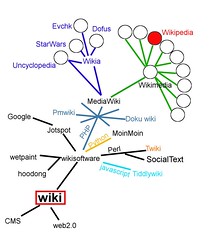
(Photo - wiki world (draft) by kaurjmeb)

Tuesday, May 15, 2007

Atlantic Internet Marketing Conference (AIM 2007) Day Two

Another information rich day at AIM 2007. Today's focus was more on the technologies and tools available for companies and marketers to do what it is they do attract and retain customers.

Here are the highlights of the presentations that I attended, followed by my thoughts on the day and the conference.

Secrets of Successful Web Sites

The presenter was Rob Swick, Senior Strategist, AlphaSearch (and one of the driving forces behind AIM 2007).

"The main thing is to make the main thing the main thing" - Mike Lipkin. In other words - focus on what it is you do and do it well. here are the main things for a successful Web site:
  1. Planning - Create a plan
  2. Create (borrow, steal) rules
  3. Strive for structure and simplicity
  4. Home page is the main page
  5. Understand the team, what they do
  6. Fill the Funnel - grow the relationship - be found
Some of Rob's rules:
  1. Navigation buttons - 7 or less
  2. Tools go in the "tool nav"
  3. People don't read, they skim
  4. Earlier pages promote internal pages
  5. Show it
  6. White is your friend - whitespace and white backgrounds are OK
  7. If you are not capturing e-mail addresses you are wasting money
Panel Discussion - Understanding Internet Technology
  • Managing client expectations is the most important thing - know exactly what a Web page will and won't do
  • Keep things fresh and updated
  • Simplify technology for clients
  • Understand costs involved in site design/video production
  • Communication is essential
  • Bridge the gap between client wants and reality
  • Panel was somewhat anti-geek/anti-technology, more focussed on business processes
Electronic Personality and Positioning

Presenter was Wilma Hartmann from Applecore Interactive

Web sites that work have their own personality - it's all about identity alignment


The total online experience is carried on the following four pillars:
  1. Design
  2. Content
  3. Navigation
  4. Functionality
There are things you can control about your Web site and things you cannot control or can only influence:
  • You can control
    • Domain URL
    • Search Engine
    • Links
    • Partners/affiliates/listings
    • Online advertising
    • e-News/e-Mail
    • Traditional Marketing and advertising
Web 2.0 is like nailing jello to a wall - you have little control
  • You cannot control
    • Blogosphere
    • RSS
    • Podcasts
    • Social marketing/chat
    • Rooms/newsgroups
    • Unsolicited listings
  • You can influence
    • Bologosphere
    • RSS
    • Podcasts
    • Social marketing
    • Unsolicited listings
Emerging Web 2.0 values:
  • Authenticity
  • Democracy
  • Innovation
  • Co-creation
How do you protect your brand in this fluid environment (thriving in a co-creative world)?
  • Monitor (Google/Yahoo, yourself)
  • Influence (be a part of Web 2.0)
  • Stay true to who you are
Future decisions for emerging media - do we or don't we. For example Sweden has set up an embassy in Second Life. Adopt what works with your personality

Digital Content and marketing in the Multi-Platform World

Presenter was Graham MacDougall, Director of Digital Media, DHX Media

A changing media landscape - much more complex and fractured environment- digital media formats/devices/tools

Major changes in how people access media

Content/Distribution Models
  • Blogging - personify brands
  • Podcasting -fivefold increase in revenue from 2006-2011)
  • Social networking - 1 out of 4 Internet users access a social networking site once per month
  • Rich media - Flash, video
  • Music - now 10% of total music sales
  • IPTV (Internet Protocol TV - Joost, Apple TV, JumpTV)
  • Mobile - 20% of users browse Web from cell and smart phones, but slow growth for now
Graham highly recommended Jakob Nielsen's book The Web Bible - Prioritizing Web Usability

Viral Marketing

Presenter was Sarah Oldford, Online Media Manager, Colour

"You don't find your audience - your audience finds you"

There are now many ways to reach out online. Viral marketing is the phenomenon that facilitates and encourages people to pass on a marketing message
  • No defined viral campaign strategy
  • No solid best practices - it's constantly evolving
  • There is however, trying too hard
  • Avoid copying/mimicking existing viral campaigns
  • Viral marketing is hit or miss
  • Start with the brand
  • Look to your marketing messages for brainstorming
  • When you have a relevant, fun idea then talk about online
Who has done it well?
Panel - Which Medium For My Message?
  • Understand your audience
  • Think like your customer/consumer
  • Capability of organization to support channel selected
Mediums
  • RSS - push content
  • Blogs - highly search engine friendly
  • Tagging - Digg, del.icio.us, technorati
  • Rich media
  • Text
  • Cell phones / smart devices
These must all be used appropriately - need to use more than just one technology and possibly multiple formats of the same content (Real, Quicktime etc.)

Blogs are trust mechanisms

Panel - The Good, he Bad, and the Ugly

The final session of the day, the panel reviewed several Web sites of attendee companies and others. They were mostly unkind, finding fault with most, which was interesting, because several of the reviewed sites were created by panel members (which just goes to show you that if you put four Web developers in a room, you will get at least six opinions).

My Thoughts

It was another information packed days. It is apparent that the marketing world is aware of Web 2.0 and is doing its best to take advantage of these tools and technologies. There is still a gap between the knowledge of the marketing professionals and business owners. many are still trying to come to terms with the potential impact and benefits of Web 2.0 and social networking on their businesses.

It will be interesting to see where marketers go next. With the media markets now so fractured, marketers must decide which channels to use to get their messages out. It looks like the Internet is rapidly becoming the channel of choice, and that all types of devices and approaches to making customers aware of what is available will be the next frontier...


Sunday, May 13, 2007

The Conference Mash-Up

From Elluminate's blog "Transforming teaching and learning through innovative technology", this post - "The conference mash-up: Conference + Webconf + Blog + Moodle + Wiki (A Conbooki?)", talks about the changing nature of conferences as they evolve into something new - not held just in a hotel ballroom, but in a ballroom, online, through blogs, and wikis, and yes through Elluminate and other ways all at the same time that allow non-traditional conference audiences to attend.

The post gives several great examples of what these "mashedup" conferences can be. I have attended (remotely) a couple of them and they work - all the advantages of attending a conference without the travel, the jet lag, or the bag of goodies (hey! wait a second...).

A very cool concept and I believe the conference of the future...

Wiki-Based Software Guide

This might be one of the best software review sites I have seem - Iterating.com. It's a wiki-based software guide covering open source software (OSS) and commercial software. It's both a directory and a review site and you can filter it based on categories and types of software that you are looking for. Users can review and comment on the software - who better to do that than the actual users. A very cool, practical use of a wiki...

Saturday, March 31, 2007

My Web 2.0 Toolkit

I've been exploring and using all sorts of Web 2.0 tools and technologies for some time now and thought I would share the ones that make up my "Web 2.0 Toolkit". These are the Web 2.0 tools that I use pretty much everyday in both my personal life and as an adult educator. So, in no particular order, here they are:
  • Blogging - Well - I'm obviously using Blogger, but Wordpress is pretty cool too
  • RSS - I'm sold on Netvibes - it's become my number one source of online information - I literally get hundreds of feeds from it daily
  • Pictures - Flickr and Photobucket. I use Flickr for storing and showing off my photos and Photobucket for my stock photos that I use on line. I also use flickrCC to find stock photos online (remember to abide by the licensing terms of the owners - msot use one of the Creative Commons licenses)
  • Wikis - I have several different wikis now at wikispaces but pbwiki is a really good tool as well. Wikis are a great educational tool, particularly if you get your learners to maintain them. A good way to answer the question "What do we do now that the course is over?".
  • Collaboration - Google Groups and Google Notebook. Two great tools from Google, I plan on using them to replace textbooks in my courses.
  • To-do List - Remember The Milk is an easy to use to-do list that keeps me on track
  • Calendar tool - Google Calendar - just about runs my life now, would be lost without it - and I can share my calendar too so people know what's going on with me.
  • Social Networking - Facebook - a great tool for staying in touch, I'm in the process of setting up an alumni group for my former students
  • Video conversions - Vixy.net is great if you absolutely must have a local copy of that favourite online video. A great tool if you don't always have a high-speed Internet connection
  • Staying current - Twitter is a great tool for letting people know where you are and what you are up to although I do not use it nearly as much as some. I actually use the custom status messages in GMail more
  • Conferencing - Elluminate's vRoom - a great free tool from Elluminate gives you all of the capabilities of Elluminate except for recording and a limit of three sites. Not really a Web 2.0 tool (try Vyew if you want a Web-based conferencing tool).
Well there you have it - my current Web 2.0 toolkit - I am sure that it will continue to evolve over the months to come and I'll do my best to let you know what I am using...

(Photo from David Babylon)

Saturday, February 24, 2007

Tag! You're It...

As I continue to look at all of the new tools and technologies that are cropping up all over the Web, I 'm trying to figure out what exactly makes a Web 2.0 application a Web 2.0 application. Is it user customization, social networking, sharing and modifying information, or something else?

The one common thing that I have seen in most of the Web 2.0 applications that I have looked as is tags - the ability to categorize or group what you are doing so as to make the information produced easier to share and find.

So, is it valid then to say that in order to be a Web 2.0 application, tags must be used? While not all inclusive, I think it's a valid "litmus test", and a way to identify something as being Web 2.0. Here are just a few Web applications that use tags. You can decide if they are Web 2.0 or not:
And I know that there are many, many more... Which ones are your favourites?